


Architecture firms today work with tools that would have seemed like science fiction just ten years ago. Simple drafting software has evolved into complex platforms that handle everything from 3D architectural modeling to environmental analysis. If you’re working in architecture now, you need to master multiple programs just to keep up.
The architectural technology landscape looks nothing like it did five years ago. Architectural design software now does far more than create drawings. These platforms simulate building performance, coordinate entire project teams, and use AI in architecture to automate tasks that used to take hours. Modern BIM design software connects architects, engineers, and contractors in ways that were impossible before.
You’ll find 3D modeling software integrated with cloud platforms, making it easier to share work and get feedback. But this also means architects need to learn more tools than ever before. Traditional CAD skills aren’t enough anymore. You need to understand parametric design, rendering engines, and project management systems.
Building Information Modeling has become the standard way to work. Modern architectural visualization software includes real-time ray tracing, photogrammetry, and machine learning features that make modeling faster and more accurate. This shift requires architects to think differently about their tools and workflows.

What Software Do Most Architects Use?
Most architecture firms have settled on a core set of programs that work well together. The choices aren’t random – they reflect what actually works in professional practice and what clients expect to receive. Understanding these tools helps you make informed decisions about your career path and project requirements.
Autodesk Revit: The BIM Standard
Autodesk Revit dominates the BIM software space, used by about 60% of architecture firms. The software excels at keeping 2D drawings and 3D models synchronized. When you change something in the model, all your drawings update automatically.
Revit’s 2024 iteration added better cloud collaboration and improved performance for large projects. The software handles complex building systems well and produces the documentation that contractors need. Most firms choose Revit because it’s what everyone else uses, making file sharing straightforward.
Revit’s parametric modeling approach changes how you think about buildings. Instead of drawing lines, you place walls, doors, and windows that understand their relationships to each other. This intelligent modeling creates more accurate documentation and reduces coordination errors between different building systems.
AutoCAD: Still Essential for Details
AutoCAD remains important for detailed drawings and technical documentation. Many firms use it alongside Revit, especially when transitioning from older 2D workflows. The software’s customization options through LISP programming make it adaptable to specific firm needs.
AutoCAD’s file format compatibility keeps it relevant. When you need to share files with consultants or contractors who don’t use BIM, AutoCAD usually works. The precision and control it offers for technical drawings haven’t been matched by newer tools.
The command-line interface in AutoCAD teaches you to think systematically about drawing construction. This foundation translates well to other platforms, even if their interfaces look completely different. Many architects still prefer AutoCAD for complex details where precision matters more than intelligence.
Rhino 3D: Complex Geometry Made Simple
Rhino 3D handles complex shapes that challenge other programs. Firms working on parametric design or advanced facade design often choose Rhino for its NURBS modeling capabilities. The software excels at curved surfaces and non-standard geometries.
Grasshopper, Rhino’s visual programming add-on, lets architects create custom algorithms without traditional coding. You can develop automated workflows for form generation, environmental analysis, and fabrication coordination. This makes Rhino popular with firms pushing geometric boundaries.
Rhino’s strength lies in its mathematical precision for complex surfaces. While other programs struggle with double-curved forms or intricate geometric relationships, Rhino maintains accuracy throughout the design process. This reliability makes it essential for projects involving advanced manufacturing or complex structural systems.
SketchUp: Quick Conceptual Modeling
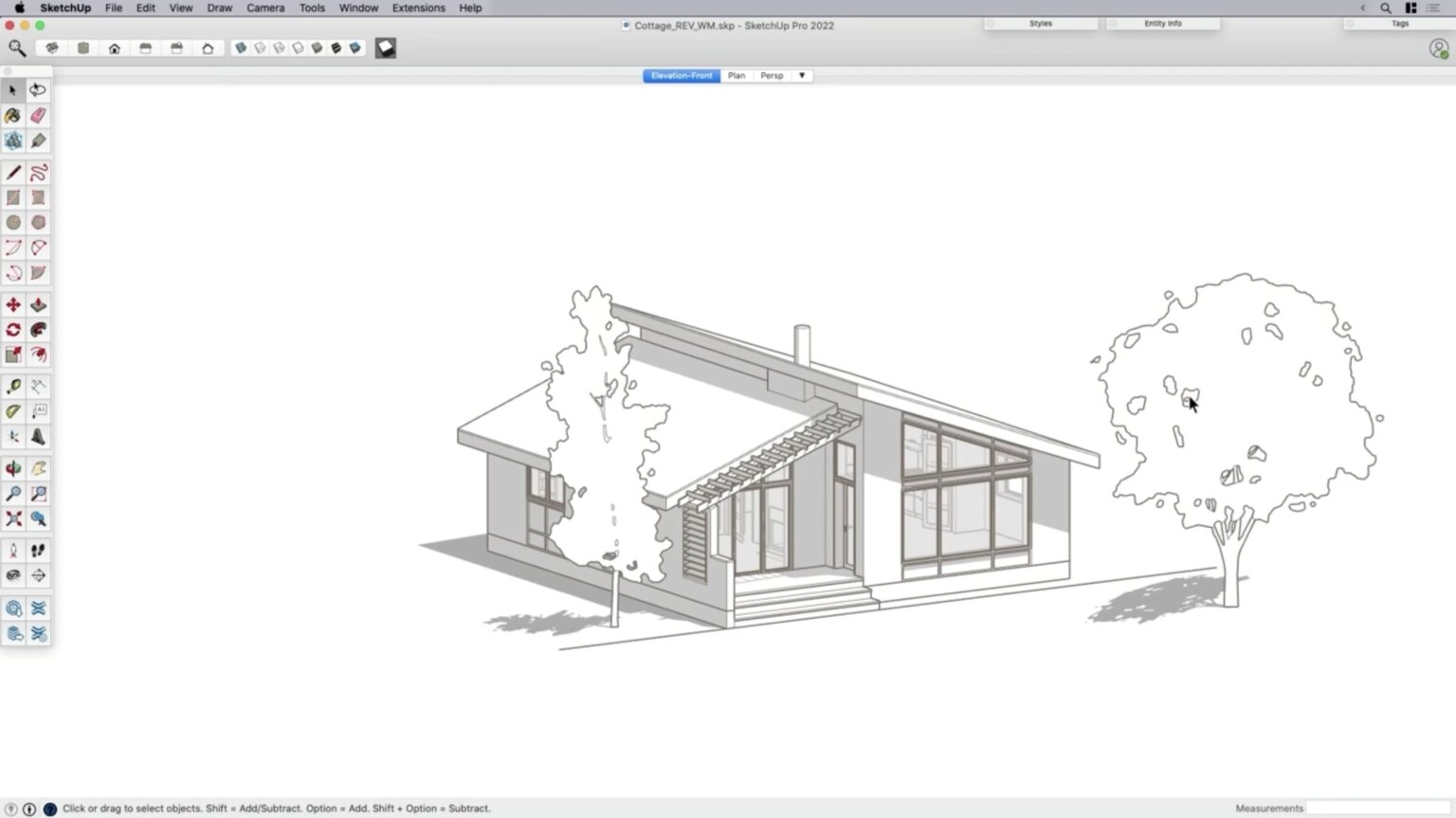
SketchUp works well for early design phases and smaller residential projects. Its intuitive interface makes 3D architectural modeling accessible to architects who don’t want to fight with complex software. The learning curve is gentle, making it popular for quick studies and client presentations.
SketchUp’s limitations become apparent on complex commercial projects. It lacks the advanced surface modeling and BIM coordination features that large projects require. Most firms use it for specific tasks rather than complete project workflows.
The software’s push-pull interface makes quick massing studies incredibly fast. You can explore multiple design options in minutes rather than hours. This speed makes SketchUp valuable for early design phases where you need to test ideas quickly before committing to more detailed modeling.
sketchup viewport 1536×863
Which Architectural Software is Best for Beginners?
Starting your architecture career means choosing software that will serve you well long-term. The decision affects your job prospects and the types of projects you can work on. Different software paths lead to different career opportunities, so understanding your goals helps guide your choices.
Starting with Revit Architecture
Revit Architecture makes sense for beginners serious about BIM careers. The learning curve is steep, but the skills transfer directly to professional practice. Autodesk’s educational resources include structured learning paths and certification programs.
Revit teaches you to think about buildings as systems rather than collections of lines. This parametric modeling approach becomes second nature with practice. The software’s coordination features show you how building systems interact, knowledge that benefits every architect.
Learning Revit early in your career gives you access to the largest number of job opportunities. Most firms using BIM have standardized on Revit, making your skills immediately applicable. The software’s complexity means mastering it takes time, but the investment pays off in career flexibility.
Rhino and Grasshopper for Computational Design
If you’re interested in parametric design and complex geometry, start with Rhino and Grasshopper. The visual programming interface makes algorithmic design accessible without requiring coding skills. You’ll learn to think systematically about design problems.
Mac-compatible software options have expanded significantly. Both Rhino and SketchUp now offer full feature parity across operating systems, removing barriers for Mac users. This makes Architectural Design Software for Mac users more competitive in the job market.
Grasshopper’s node-based interface teaches you to break down complex problems into smaller, manageable parts. This systematic thinking applies to all aspects of architecture, not just computational design. The skills you develop translate to better problem-solving in traditional design projects.
AutoCAD for Foundation Skills
AutoCAD teaches fundamental drafting concepts that apply to other platforms. The command-line interface and precision drawing tools develop skills that transfer well. However, focusing exclusively on 2D workflows may limit your career options in BIM-focused practices.
Consider mobile architectural drawing applications for field documentation and preliminary sketching. These tools increasingly connect with desktop workflows through cloud synchronization.
AutoCAD’s precision requirements teach you to think carefully about drawing organization and accuracy. These habits serve you well in any software platform. The discipline of command-line workflows also prepares you for more advanced scripting and automation in other programs.
What are the Best BIM Software Options in 2025?
The BIM software landscape has matured into distinct categories serving different project types and firm sizes. Each platform has developed specialized strengths that make them better suited for specific applications. Understanding these differences helps you choose the right tool for your projects and career goals.
Enterprise-Level Solutions
Autodesk Revit continues leading architectural BIM implementation. Recent updates focus on cloud collaboration and AI-assisted modeling features. Revit Cloud Worksharing enables real-time multi-user editing with automatic conflict resolution. The platform’s machine learning algorithms can predict material quantities and construction sequencing based on project history.
Enterprise-level BIM platforms handle large teams and complex projects better than smaller alternatives. They include advanced project management features, detailed reporting capabilities, and integration with construction management software. These tools become essential when coordinating projects with hundreds of team members across multiple disciplines.
The cloud-based collaboration features in enterprise BIM platforms change how teams work together. Real-time synchronization means team members can see changes as they happen, reducing conflicts and improving coordination. This immediacy makes large projects more manageable and reduces the time spent on coordination meetings.
Infrastructure-Focused Platforms
Bentley MicroStation and AECOsim Building Designer target large infrastructure projects and complex institutional buildings. These platforms excel at handling large datasets and complex geometric relationships. Healthcare facilities, airports, and mixed-use developments with civil engineering components benefit from Bentley’s broader infrastructure ecosystem.
Infrastructure-focused BIM platforms integrate with surveying equipment, GIS databases, and civil engineering software in ways that architectural-focused tools don’t. This integration becomes crucial for projects where the building and site infrastructure need tight coordination. The software handles utility coordination, site grading, and environmental compliance more effectively than general-purpose BIM tools.
User-Friendly Alternatives
Graphisoft ArchiCAD maintains strong market presence in Europe and among firms prioritizing intuitive interfaces. The software’s Virtual Building concept predates Autodesk’s BIM implementation and excels in early design phases and client presentations. Recent updates have improved interoperability with other BIM platforms through better IFC export capabilities.
ArchiCAD’s interface design philosophy prioritizes ease of use over feature complexity. This approach makes the software more accessible to architects who want BIM capabilities without the steep learning curve of more complex platforms. The software’s visualization capabilities rival dedicated rendering programs, making it popular for design presentations.
Smaller Firm Solutions
Vectorworks Architect provides integrated BIM and CAD capabilities particularly suited to smaller firms and mixed-discipline practices. The software combines strong 2D drafting with 3D modeling capabilities, offering flexibility for firms transitioning to full BIM implementation.
Smaller firm BIM solutions focus on flexibility and cost-effectiveness over enterprise features. They provide essential BIM capabilities without the complexity and cost of larger platforms. This makes them ideal for firms that need BIM coordination but don’t have dedicated BIM managers or large project teams.
AI-Powered Platforms
Emerging cloud-based platforms like Spacemaker (now integrated with Autodesk) and Finch represent the next generation of AI-assisted BIM tools. These platforms analyze site constraints, zoning requirements, and performance criteria to generate multiple design alternatives automatically.
AI-powered BIM platforms change the early design process by generating and evaluating thousands of design options automatically. This capability helps architects explore a much wider range of possibilities than traditional design methods allow. The software can optimize for multiple criteria simultaneously, including cost, environmental performance, and code compliance.
Architectural Visualization and AI Integration
Architectural visualization software has been transformed by AI capabilities and real-time rendering technology. What used to take hours of setup and overnight rendering can now be done interactively. This speed change affects how architects present their work and collaborate with clients. The integration of AI in architecture creates new possibilities for design exploration and client communication.

Midjourney By: shayanshamlou
Real-Time Rendering Engines
Chaos V-Ray remains the industry standard for high-quality architectural rendering. GPU acceleration enables interactive preview workflows that make material development and lighting refinement much faster. The software imports directly from major BIM platforms while maintaining material assignments and geometric accuracy. AI denoising algorithms reduce render times by up to 60% while maintaining image quality.
Real-time rendering changes how architects work with materials and lighting. Instead of waiting hours to see the results of a change, you can adjust materials and see the results immediately. This interactivity makes the design process more intuitive and allows for more experimentation with different visual approaches.
The integration of AI in rendering engines automates many time-consuming tasks. AI can automatically optimize lighting placement, suggest material combinations, and even generate realistic entourage elements. This automation frees architects to focus on design decisions rather than technical rendering setup.
Interactive Visualization Platforms
Unreal Engine has become a powerful platform for real-time architectural visualization. The software enables immersive VR experiences and interactive client presentations. Blueprint visual scripting allows architects to create custom interactions without traditional programming. Integration with photogrammetry workflows enables realistic site context modeling.
Interactive visualization platforms change how architects present their designs to clients. Instead of static images, you can create immersive experiences that let clients walk through and interact with the proposed design. This experiential approach helps clients understand spatial relationships and design intent more effectively than traditional presentation methods.
The gaming industry’s investment in real-time graphics benefits architectural visualization. Techniques developed for video games, like advanced lighting systems and realistic material rendering, are now accessible to architects. This technology transfer creates opportunities for more engaging and realistic architectural presentations.
AI-Powered Design Tools
AI in architecture includes platforms like Midjourney and DALL-E 2 for conceptual image generation. While these tools require careful consideration of design authorship, more practical AI implementations include automated space planning, structural optimization, and energy performance prediction.
AI-powered design tools change the early conceptual phase by generating multiple design alternatives automatically. These tools can explore design possibilities that human designers might not consider, expanding the creative palette available to architects. The challenge lies in maintaining design intent and professional judgment while using AI-generated content.
Practical AI applications in architecture focus on optimizing building performance and automating routine tasks. AI can analyze energy performance, optimize structural systems, and coordinate building systems more efficiently than manual methods. These applications enhance rather than replace human design judgment.
Mobile and AR Applications
Interior design applications increasingly incorporate AR capabilities that allow clients to visualize proposed designs within existing spaces using mobile devices. This bridges the gap between technical drawings and experiential understanding.
Mobile AR applications make architectural visualization accessible to clients who might struggle with traditional drawings. By overlaying proposed designs onto existing spaces, clients can better understand the scale and impact of proposed changes. This technology particularly benefits renovation projects where clients need to visualize changes to familiar spaces.
Specialized Tools and Emerging Technologies
Modern architectural practice requires specialized software for specific technical requirements and project phases. These tools address particular challenges that general-purpose software can’t handle effectively. Understanding when and how to use specialized tools distinguishes competent practitioners from those who struggle with complex project requirements.
Urban Planning and Analysis
Urban planning software has evolved to incorporate GIS data integration, demographic analysis, and environmental simulation capabilities. These platforms inform large-scale design decisions and policy development with quantitative data.
Urban planning software connects architectural design with broader urban systems. This integration helps architects understand how their buildings fit into larger urban contexts and systems. The software can analyze pedestrian flow, traffic patterns, and environmental impacts at the neighborhood scale.
GIS integration in urban planning software provides access to vast databases of geographic and demographic information. This data helps architects make informed decisions about program distribution, accessibility, and environmental impact. The quantitative analysis capabilities support evidence-based design decisions.
Environmental Performance Analysis
Computational fluid dynamics (CFD) software like Ansys Fluent and Autodesk CFD enable detailed environmental performance analysis for complex building geometries and urban microclimates. These platforms require technical expertise but provide quantitative data supporting sustainable design strategies and regulatory compliance.
Environmental performance analysis software helps architects understand how their designs interact with natural systems. This understanding becomes increasingly important as building codes require higher performance standards and clients demand more sustainable solutions. The software can model wind patterns, thermal comfort, and daylight distribution with scientific accuracy.
CFD analysis requires understanding of physics and engineering principles beyond typical architectural training. This technical complexity means many architects work with consultants who specialize in environmental analysis. However, basic understanding of these tools helps architects make better design decisions and communicate more effectively with technical consultants.
Advanced Parametric Design
Parametric design platforms beyond Grasshopper include Dynamo for Revit users and GenerativeComponents for MicroStation environments. These tools enable architects to develop custom algorithms for form generation, optimization routines, and automated documentation workflows.
Advanced parametric design tools change how architects approach complex geometric problems. Instead of manually modeling complex forms, you can create algorithms that generate and modify geometry automatically. This approach enables exploration of design alternatives that would be impossible to create manually.
Parametric design thinking applies to more than just complex geometry. The systematic approach to problem-solving that parametric tools teach helps architects organize their thinking about all aspects of design. This organizational skill benefits project coordination, design development, and construction documentation.
Project Collaboration Platforms
Project collaboration platforms like BIM 360, ACC (Autodesk Construction Cloud), and Procore integrate document management, issue tracking, and progress monitoring capabilities. These cloud-based systems coordinate multi-disciplinary design teams and construction administration workflows across geographic boundaries.
Project collaboration platforms change how architects manage information throughout the project lifecycle. Instead of relying on email and file sharing, these platforms provide centralized access to current project information. This centralization reduces coordination errors and improves project delivery timelines.
Cloud-based collaboration enables distributed teams to work together effectively. Architects can collaborate with consultants and contractors regardless of geographic location. This capability expands the potential client base for architectural firms and enables access to specialized expertise from anywhere in the world.
Supporting Design Skills
Professional development requires continuous learning across multiple software platforms. Graphic design software skills remain essential for presentation development and marketing materials. New tools for virtual reality, augmented reality, and mixed reality applications create opportunities for innovative client engagement.
Supporting design skills complement core architectural software knowledge. Graphic design capabilities help architects communicate their ideas more effectively. Photography and video editing skills support project documentation and marketing efforts. These complementary skills become increasingly important as architectural practice becomes more visual and media-focused.
The architectural technology ecosystem of 2025 demands practitioners who can navigate complex technological workflows while maintaining focus on fundamental design principles. Success requires strategic software selection based on project requirements, firm culture, and long-term career objectives. The integration of AI capabilities, cloud collaboration, and real-time visualization will continue reshaping professional practice, creating opportunities for architects who embrace technological advancement while preserving the creative and critical thinking skills that define exceptional design.

Emily Reyes is a Brooklyn-based architecture writer and Article Curator at Arch2O, known for her sharp eye for experimental design and critical theory. A graduate of the Southern California Institute of Architecture (SCI-Arc), Emily’s early work explored speculative urbanism and the boundaries between digital form and physical space. After a few years in Los Angeles working with boutique studios on concept-driven installations, she pivoted toward editorial work, drawn by the need to contextualize and critique the fast-evolving architectural discourse. At Arch2O, she curates articles that dissect emerging technologies, post-anthropocentric design, and contemporary spatial politics. Emily also lectures occasionally and contributes essays to independent design journals across North America.