

Autodesk Forma is a browser-based conceptual design platform, born from the 2020 acquisition of Space maker and rebranded in 2023, that runs sun, wind, noise, and carbon calculations on a massing model in seconds — no engineering degree required. For architects who already own the AEC Collection, it’s one of the fastest ways to turn a gut feeling about a site into a defensible, data-backed design decision.
What does Autodesk Forma actually do?
Forma is a cloud-based conceptual planning platform that calculates real-time environmental data — sun hours, microclimate comfort, wind behavior, acoustics, solar energy potential, and embodied carbon — directly on early-stage massing models. There’s no export, no separate simulation software, and no waiting overnight for a batch job. You sketch a mass, click an analysis tile, and a color-coded map appears over your geometry within seconds to a couple of minutes, depending on the analysis.
The platform’s lineage matters here. Forma began life as Spacemaker, a Norwegian startup that Autodesk acquired in November 2020 for roughly $240 million specifically because of its machine-learning approach to site analysis. Autodesk retired the Spacemaker name in May 2023, folding its AI engine into FormIt’s massing tools to create Forma. That history explains why the analysis suite feels so different from a traditional Revit workflow — it wasn’t built by a BIM team, it was built by a team obsessed with making urban environmental math instant.
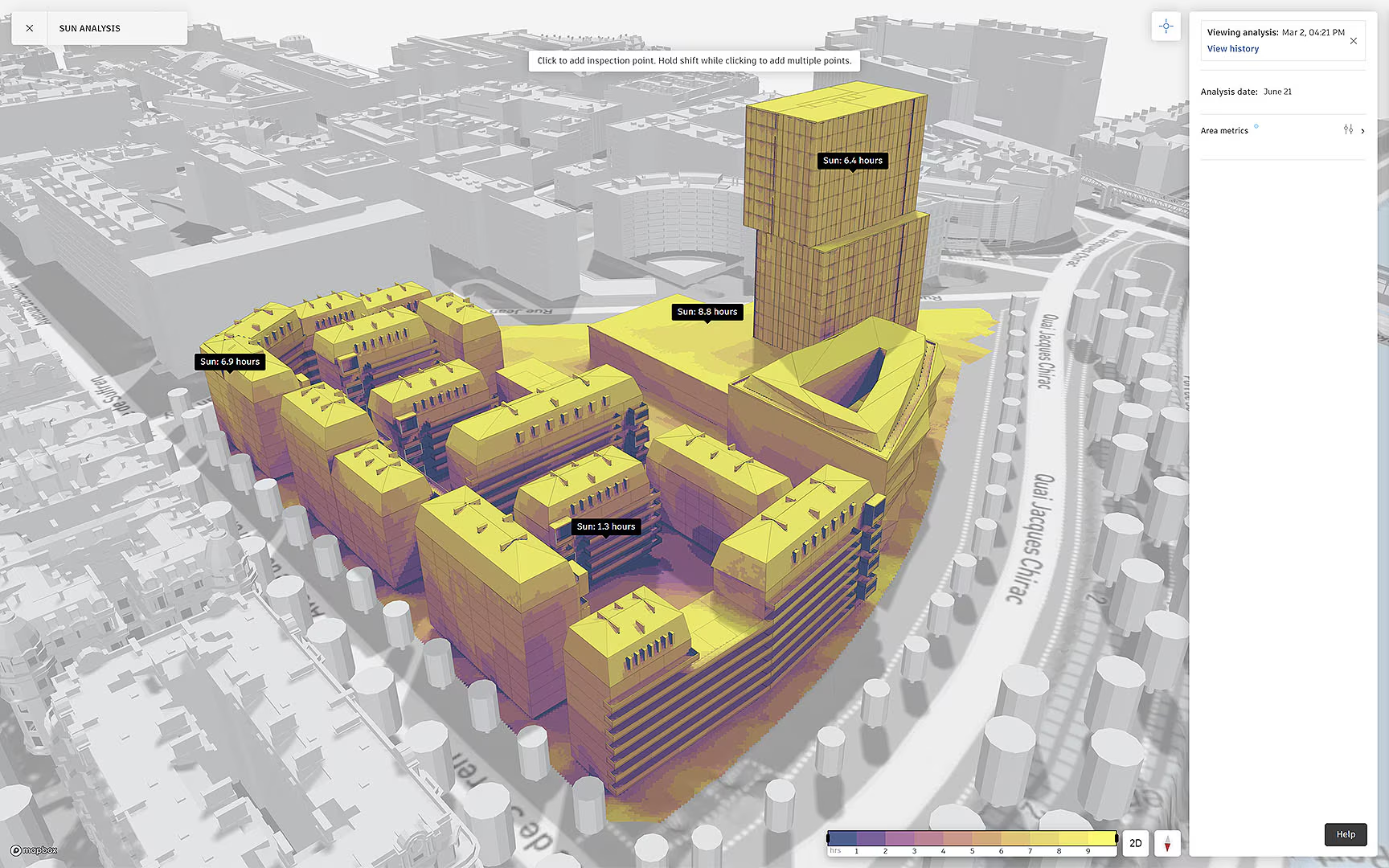
Sun hours analysis performed inside the Autodesk Forma platform, showing a color-coded heatmap of direct daily sunlight across a massing model and site to guide balcony, courtyard, and glazing placement.
In practice, most firms use Forma the way they’d use a sketch model on a physical site table — except this “table” tells you, in numbers, whether your massing choice is going to leave a courtyard in permanent shadow or turn a plaza into a wind tunnel. That’s the real value proposition: it collapses the feedback loop between “what if we tried this” and “here’s what that would actually do” from days down to minutes.
Is Forma free to use?
No, Forma runs on a commercial subscription model, but it’s bundled at no additional cost inside the standard Autodesk AEC Collection — meaning a large number of practices already have access and simply don’t know it. Standalone, Forma is priced separately from the Collection; check your Autodesk account portal or ask your CAD manager, because it’s common for firms to be paying for AEC Collection seats while nobody on the design team has ever opened Forma.
Autodesk also offers a full-featured trial period for firms that want to test the analysis suite before committing, along with free access for students and educators. If your practice is deciding whether to formally roll Forma into the concept-design phase, that trial window is the cheapest way to validate the workflow on a real project before training the rest of the studio.
What analysis types does Forma include?
Forma includes sun hours, daylight potential via Vertical Sky Component, solar energy capture, embodied carbon, noise dispersion from road and rail, microclimate perceived outdoor comfort, and rapid AI-driven wind analysis. Each one is designed to be read at a glance — colored heatmaps and simple percentage statistics rather than raw CFD output — so a designer without an engineering background can act on the result immediately.
| Analysis | What it tells you | Typical use |
|---|---|---|
| Sun hours | Hours of direct sun on ground or facade for any chosen date | Balcony, courtyard, and glazing placement |
| Daylight potential (VSC) | How much of the sky a facade point can “see” | Window sizing, interior daylight compliance |
| Wind (rapid & detailed) | Pedestrian comfort, wind speed and direction | Massing, setback, and podium design |
| Microclimate | Perceived outdoor temperature combining sun, wind, weather | Outdoor amenity space design |
| Noise | Rail/road noise dispersion across the site | Unit layout, facade construction decisions |
| Solar energy | Annual solar radiation and PV output potential | Roof and facade panel planning |
| Embodied carbon | Lifecycle carbon estimate for the proposed mass | Structural system and material comparisons |
Of these seven, sun hours analysis has consistently been the single most-run tool on the platform — it was reported as the most popular Forma analysis of 2025. That’s not surprising once you think about it from a practitioner’s chair: passive solar design is the highest-leverage, lowest-effort sustainability move available at the conceptual stage. Rotating a building 15 degrees or shifting a massing block costs nothing in fees and can be tested in the time it takes to refill your coffee, whereas correcting a poor solar orientation after schematic design is a real redesign.
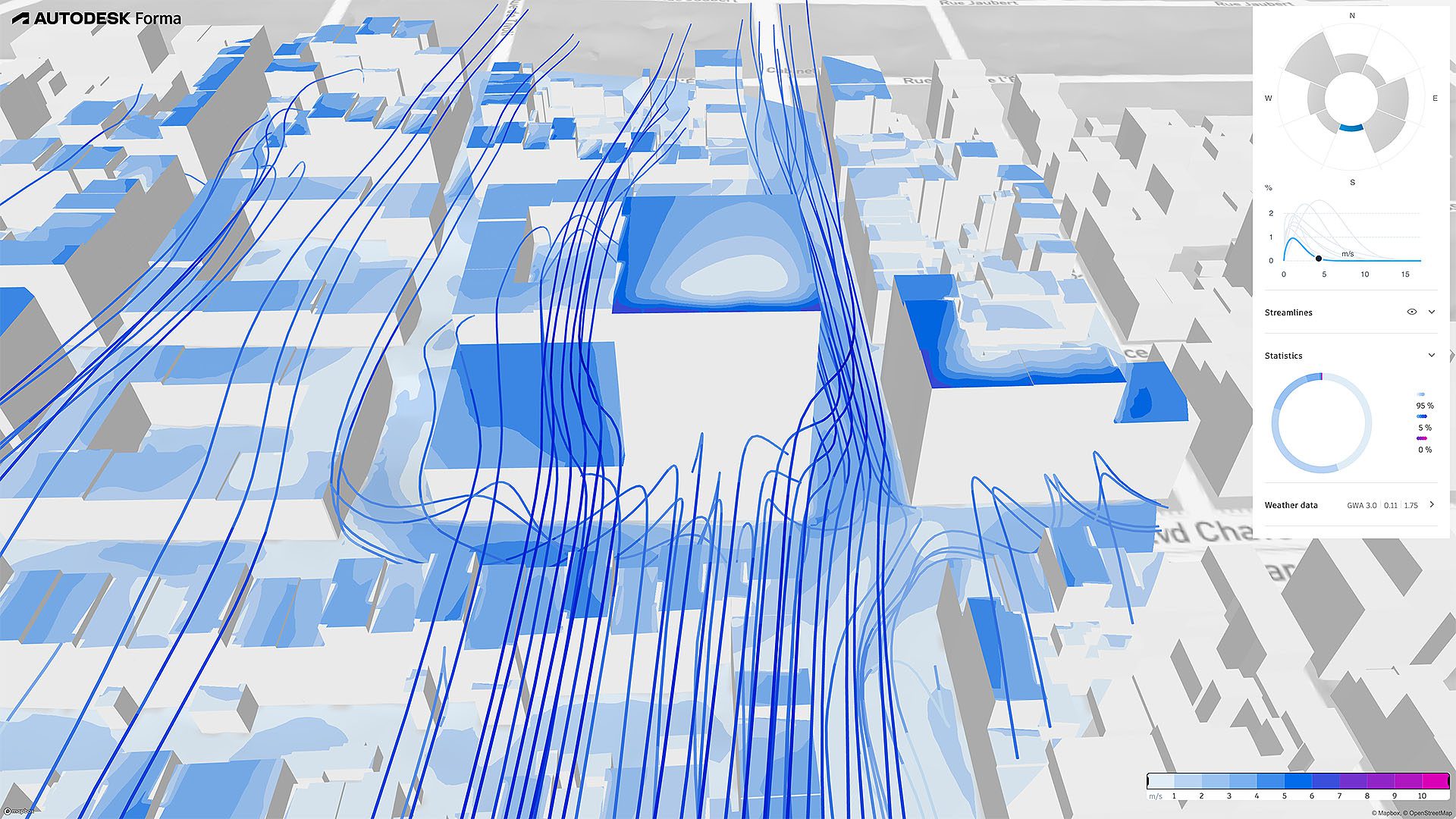
Wind analysis in Autodesk Forma evaluating pedestrian-level wind speed and direction across a site, using rapid AI-driven prediction to reveal environmental impacts on massing, setbacks, and podium design.
Operational warning: every one of these calculations is only as trustworthy as the context data sitting underneath it. If your terrain model, adjacent structures, and precise geolocation aren’t accurately layered in before you run an analysis, Forma will still produce a clean, confident-looking heatmap — it just won’t be describing your actual site. A gorgeous wind comfort diagram built on an unset geolocation or missing neighboring towers is worse than no diagram at all, because it looks authoritative while being wrong. Always confirm context data before you trust a result enough to act on it.
Does Forma replace a wind or structural engineer?
No. Forma’s rapid AI calculations are explicitly built to guide early massing decisions, not to replace full computational fluid dynamics studies or engineering sign-off at construction document phase. Autodesk itself frames the rapid wind and noise tools as machine-learning predictions benchmarked against detailed simulations and academic studies — good enough to compare five massing options in an afternoon, not good enough to stamp a drawing.
Think of Forma’s outputs as a triage tool. They tell you which two or three massing directions are worth pursuing and which ones have an obvious problem — a courtyard that never sees sun, a plaza with uncomfortable ground-level wind. Once you’ve narrowed the field, a licensed wind engineer or building performance consultant still needs to run detailed CFD or a full energy model before anything gets built. Forma shortens the number of expensive studies you need, it doesn’t eliminate them.
The 15-Minute Concept Launch Checklist
Here’s the real setup pipeline architects use to get from a blank browser tab to a trustworthy first analysis — skipping steps here is where most of the “beautiful but misleading” results referenced above actually come from.
- Set the site boundary. Draw or import the precise project boundary. This isn’t cosmetic — every downstream analysis area, terrain pull, and context layer references this boundary.
- Confirm the geolocation. Forma pulls sun position, prevailing wind data, and regional weather from the geolocation you set. A pin dropped a few blocks off, or left at a default location, silently corrupts every sun and wind result that follows.
- Order the automated GIS context data. Forma can auto-populate terrain, existing buildings, roads, and vegetation from regional GIS sources. Let this data layer finish loading and visually verify it against a satellite image before moving on.
- Check adjacent structures. If neighboring buildings that shade your site or block wind aren’t captured in the auto-pulled context, sketch simple placeholder masses for them manually. An empty lot next door in Forma is not the same as an empty lot in reality.
- Build your mass variations. Block out two or three genuinely different massing strategies — not just minor tweaks to one idea.
- Run the environmental impact profiles. Cycle through sun hours, wind, and microclimate on each variation and compare the statistics side by side before committing to a direction
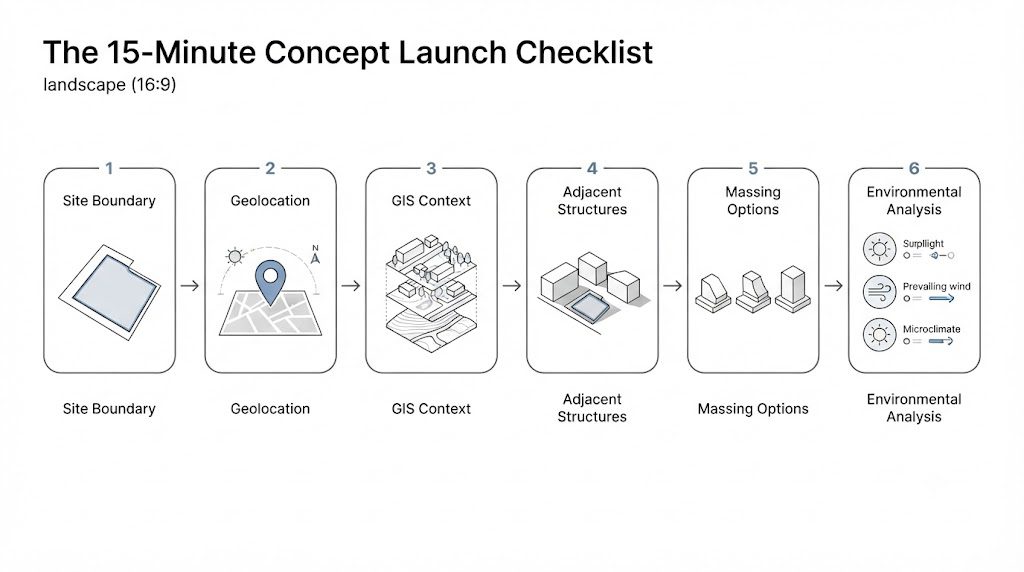
Autodesk Forma concept-stage workflow showing an early massing study with environmental analysis overlays, illustrating the site setup and mass-variation steps of the 15-minute concept launch checklist.
Platform Deep Dive: Site Design vs. Building Design
What used to be simply “Forma” is now organized under Autodesk’s broader Forma Industry Cloud, split across two modules that matter for how you plan your workflow:
Forma Site Design is the module this article has covered throughout — massing, site planning, and the full environmental analysis suite (sun, wind, noise, microclimate, solar energy, embodied carbon). It’s the mature, widely deployed part of the platform and where nearly all current AEC Collection users spend their time.
Forma Building Design is the newer, schematic-design-oriented module announced at Autodesk University in late 2025, aimed at LOD 200–300 work: detailed building modeling, facade design, interior layouts, and automated design tools, with carbon and daylight analysis carried over from the same cloud data layer. It’s positioned to pick up where Site Design leaves off, letting a project move further into schematic development before it needs to touch Revit.
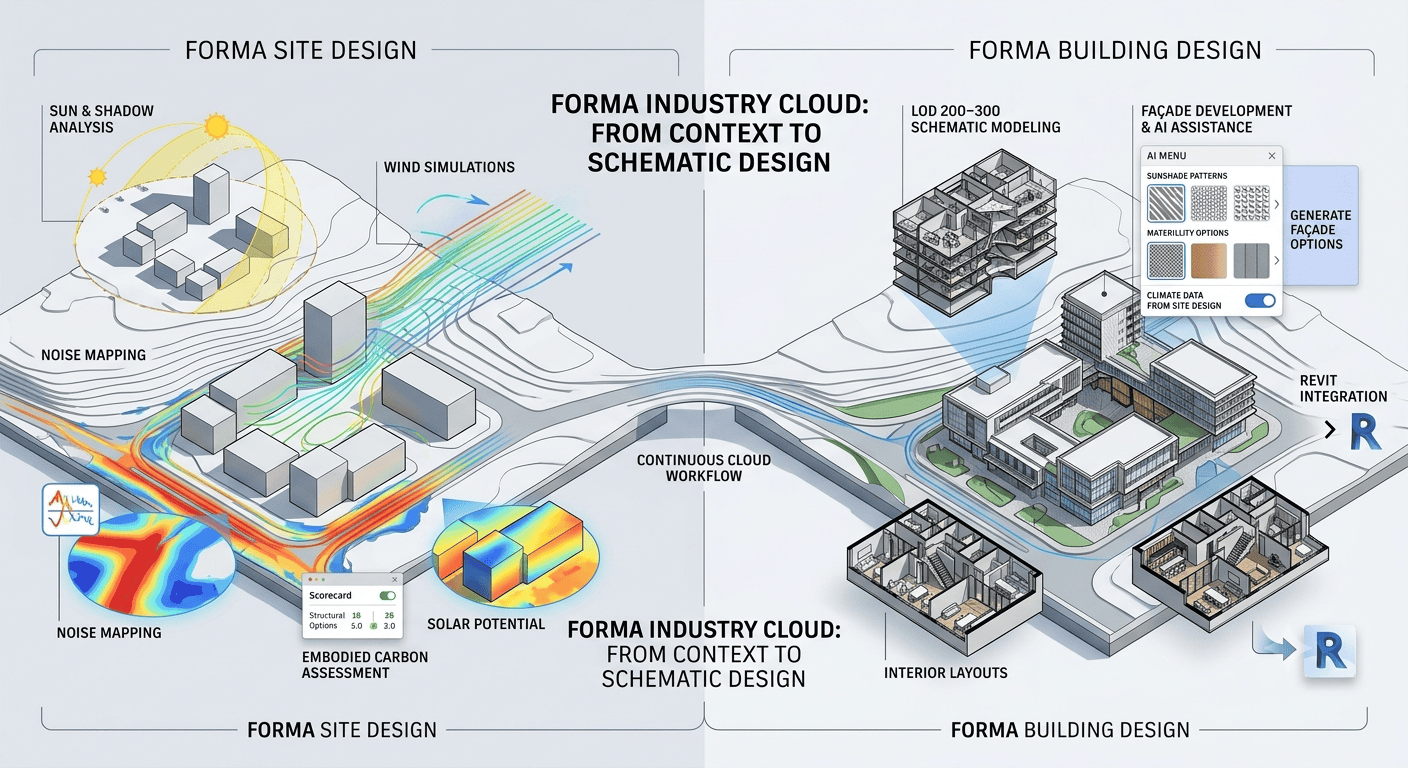
AI-generated illustration of the Autodesk Forma workflow spanning the Site Design and Building Design modules, moving from early massing and environmental analysis through detailed schematic building development.
This two-module structure is also Autodesk’s clearest answer to the newer wave of browser-native competitors — tools like Snaptrude and Arcol, which are built cloud-first from day one and are courting the same “no local install, no steep BIM learning curve” audience that made Spacemaker attractive in the first place. Forma’s advantage is depth and integration: its Revit connection is now a genuine two-way data link rather than a file export, geolocation and sustainability data carry over automatically, and firms already inside the Autodesk ecosystem don’t have to justify a new procurement line to get access. Its disadvantage is the same one every incumbent faces — a steeper learning curve and a higher standalone price than lighter-weight challengers optimized purely for speed of adoption.
For a firm evaluating where to draw the line: if your team lives in Revit and just wants trustworthy early-stage environmental data feeding straight into your BIM model, Site Design plus the Revit connection covers that need today. If you’re watching Building Design’s rollout with an eye toward replacing more of your schematic design workflow, that’s a 2026 roadmap question worth revisiting with your Autodesk rep rather than a decision to make from a feature comparison alone.
For more on where Forma fits within a firm’s broader computational design stack, see the rest of Arch2O’s software guide series covering visual scripting and BIM tools for small and mid-size practices.
 

Luca Moretti is a content strategist with a foundation in urban design and architecture. Based in Milan, he focuses on writing that bridges aesthetics, material culture, and everyday spatial experiences.